Introduction
3D printing has transformed from a niche prototyping tool into a mainstream manufacturing technology. But with that transformation comes complexity.
Professionals face constant challenges:
- How do you optimize a design for both functionality and cost?
- What are the ideal process parameters for a specific material?
- How do you choose the right equipment?
- How do you manage post-processing efficiently?
These aren't trivial questions. The wrong choices can mean failed prints, wasted material, and missed deadlines.
At Yigu technology, we've navigated these complexities for thousands of projects. This guide covers the key aspects—design, process engineering, materials, equipment, simulation, and post-processing—to help you master 3D printing from start to finish.
How Do You Design for Additive Manufacturing?
Topology Optimization: Finding the Optimal Material Distribution
Topology optimization is a powerful technique that finds the optimal distribution of material within a given design space, subject to specific loads and boundary conditions.
The result: Significant weight savings without sacrificing strength.
In aerospace: Components designed with topology optimization can be up to 50% lighter than conventionally designed counterparts—reducing fuel consumption and emissions.
Lattice Structures: Lightweight and Strong
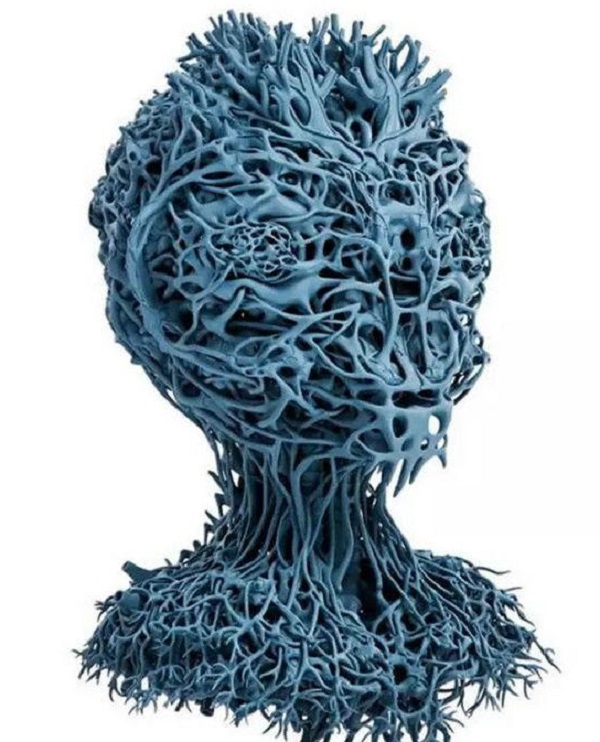
Lattice structures are intricate, lightweight frameworks that offer:
- High strength-to-weight ratios
- Excellent energy absorption
- Unique aesthetic appeal
In medical implants: Lattice structures mimic the natural porosity of bone, promoting better integration with the body. They also reduce material usage, making implants more cost-effective.
Generative Design: Let the Computer Be Creative
Generative design software explores thousands of possible design solutions based on:
- Design goals
- Constraints
- Performance criteria
It presents the best options to the designer—unlocking innovative designs that may not be possible with traditional methods.
In automotive: Generative design creates complex, lightweight parts that improve vehicle performance and fuel efficiency.
The Role of CAD Software and Parametric Modeling
CAD software is the backbone of 3D printing design. It allows precise creation, modification, and visualization of 3D models.
Parametric modeling enables designers to define relationships between design parameters. Change one parameter, and all related features update automatically.
Example: Designing a series of products with different sizes but similar shapes—parametric modeling saves significant time and effort.
Design for Functionality, Assembly, and Performance
Functionality first: Consider how the part will be used, what forces it will withstand, and how it interacts with other components.
Design for assembly (DFA) : Design parts with ease of assembly in mind—reduces production time and costs.
Design for performance: Ensure the final product meets required standards—strength, heat resistance, other properties.
What Process Engineering Do You Need to Master?
Mastering Process Control and Parameters
Process control is crucial for consistent quality. Key parameters include:
- Temperature
- Printing speed
- Layer thickness
- Extrusion rate
Each must be carefully optimized for the material and printer.
In FDM: Higher printing temperature improves filament flow but may cause warping if not controlled. Thorough testing and in-process monitoring help fine-tune parameters.
Layer-by-Layer Manufacturing: The Basics
Build orientation significantly affects:
- Strength: Parts are strongest along layer lines
- Surface finish: Orientation affects visible layer lines
- Support structure requirements: Overhangs need supports
Layer thickness determines resolution:
- Thinner layers = smoother finish = longer print time
- Thicker layers = faster print = rougher finish
Support Structures: Necessary Evil or Design Opportunity?
Support structures hold up overhanging parts during printing. They're often necessary but:
- Can be a hassle to remove
- May leave marks on the final part
Design strategies:
- Use self-supporting angles (typically <45°)
- Design lattice-based supports that are easier to remove
- Orient parts to minimize supports
In-Process Monitoring and Real-Time Feedback
Sensors track the printing process in real-time:
- Temperature
- Vibration
- Layer thickness
Real-time feedback allows operators to make adjustments during printing—reducing errors and improving quality.
Example: If a sensor detects deviation in layer thickness, the printer can automatically adjust extrusion rate.
Process Simulation: Predicting the Outcome
Process simulation software predicts how a part will print before running the actual print. Benefits:
- Identify potential issues (warping, shrinkage, incorrect support placement)
- Save time and material
- Optimize print process
- Reduce failed prints
What Materials Science Do You Need to Understand?
Making the Right Material Selection
Material selection is critical. Different materials have unique properties:
| Material | Properties | Best For |
|---|---|---|
| PLA | Easy to print, biodegradable | Hobby projects, consumer products |
| ABS | Durable, heat-resistant | Automotive, electronics |
| Nylon | Strong, flexible | Gears, functional parts |
| PETG | Strong, chemical-resistant | Mechanical parts, containers |
| Titanium | High strength-to-weight, biocompatible | Aerospace, medical implants |
| Aluminum | Lightweight, thermally conductive | Electronics cooling, lightweight parts |
Understanding Material Properties
Key properties to consider:
- Strength: Tensile, compressive, impact
- Flexibility: Elongation at break
- Heat resistance: Glass transition temperature, melting point
- Chemical resistance: Resistance to solvents, acids, bases
- Biocompatibility: Suitable for medical applications
Powder Metallurgy and Polymer Materials
Powder metallurgy is key in metal 3D printing:
- Metal powders fused using laser sintering or electron beam melting
Polymer materials are widely used:
- New polymers with enhanced properties (high-temperature resistance, improved mechanical strength) are active research areas
Composite Materials: Combining the Best of Both Worlds
Composites combine two or more materials for enhanced properties:
Carbon-fiber reinforced materials:
- High strength
- Low weight
- Applications: Aerospace, automotive, sports equipment
By carefully selecting matrix and reinforcement materials, manufacturers can tailor properties to specific applications.
Material Characterization and Testing
Material characterization analyzes physical and chemical properties to ensure specifications are met.
Material testing determines mechanical properties:
- Tensile testing
- Impact testing
- Hardness testing
Thorough characterization and testing ensure quality and reliability.
What Equipment and Systems Do You Need?
Choosing the Right 3D Printing Machine
Desktop printers (e.g., Prusa i3 MK4):
- Great for small-scale prototyping
- Educational purposes
- Easy to use, relatively inexpensive
Industrial-grade printers (e.g., EOS M 290):
- High-volume production
- Handle complex materials
- Larger part sizes
- Used in aerospace for precision parts
Laser Systems vs. Electron Beam Systems
| System | How It Works | Best For |
|---|---|---|
| Laser | High-energy beams melt or cure materials | Laser sintering, stereolithography |
| Electron beam | High-speed processing in vacuum | High-melting-point metals |
Choice depends on:
- Material being printed
- Required precision
- Production volume
Printer Calibration and Maintenance
Calibration ensures accurate, consistent prints:
- Extruder
- Build plate
- Laser system
Regular maintenance:
- Cleaning
- Checking for loose parts
- Replacing worn components
Neglecting calibration and maintenance leads to poor-quality prints, increased downtime, costly repairs.
Multi-Material Printers and Automated Systems
Multi-material printers:
- Use different materials in a single print
- Enable parts with unique properties (rigid + flexible)
- Useful for consumer products
Automated systems:
- Reduce need for manual intervention
- Handle material loading, printing, post-processing
- Suitable for high-volume production
Safety Systems and Equipment Upgrades
Safety systems protect operators from:
- High temperatures
- Laser radiation
- Toxic fumes
Features: emergency stop buttons, safety enclosures, ventilation.
Equipment upgrades:
- Software updates
- Hardware replacements
- New features (improved sensors, higher-resolution printing)
How Does Simulation and Modeling Help?
Computational Modeling and Finite Element Analysis
Finite element analysis (FEA) simulates mechanical behavior of 3D-printed parts under different loads and conditions.
Predicts:
- Stress concentrations
- Deformation
- Failure modes
Enables optimization of design and performance assurance.
Example: For a 3D-printed industrial bracket, FEA determines optimal thickness and shape to withstand expected loads.
Thermal and Mechanical Simulation
Thermal simulation:
- Understands heat generation and dissipation during printing
- Prevents warping, cracking, other defects
Mechanical simulation:
- Analyzes dynamic behavior (response to vibrations, impacts)
Combined simulations provide comprehensive understanding of part performance.
Material Flow Simulation and Process Modeling
Material flow simulation:
- Predicts how materials flow during printing
- In FDM: simulates filament extrusion through nozzle and deposition
Process modeling:
- Encompasses entire 3D printing process (design to post-processing)
- Optimizes printing process
- Reduces cycle times
- Improves quality
Predictive Analytics and Virtual Prototyping
Predictive analytics:
- Uses historical data and algorithms to predict outcomes
- Predicts print failures
- Estimates remaining lifespan of printer components
- Forecasts demand for parts
Virtual prototyping:
- Creates digital models and simulates performance
- Saves time and money
- Allows testing and refinement before physical prototyping
What Post-Processing and Finishing Techniques Matter?
Surface Treatment and Heat Treatment
Surface treatment improves finish and appearance:
- Sanding: Smooths surface, removes rough spots
- Polishing: Enhances appearance
- Chemical etching: Removes layer lines
Heat treatment improves mechanical properties:
- Annealing: Relieves internal stresses in metal parts, improves ductility and toughness
Machining, Polishing, and Coating
Machining:
- Achieves tight tolerances
- Creates features that can't be printed
Polishing:
- Further enhances surface finish
- Makes parts more aesthetically pleasing
Coating:
- Provides additional protection
- Corrosion resistance
- Wear resistance
In aerospace: 3D-printed parts may be coated to withstand harsh environmental conditions.
Deburring and Support Removal
Deburring:
- Removes sharp edges or burrs formed during printing
Support removal:
- Important for parts with complex geometries
- Methods: manual removal, solvents, mechanical means
- Choice depends on material and support complexity
Post-Processing Optimization
Optimization involves finding the most efficient, cost-effective way to perform post-processing:
- Selecting right combination of techniques
- Optimizing sequence of operations
- Using automated post-processing equipment
Benefits:
- Reduced production time
- Improved quality
- Lower costs
Yigu Technology's Perspective
At Yigu technology, we navigate these complexities every day:
Design is where value is created. We leverage generative design and topology optimization to create parts that are functional and cost-effective.
Materials drive success. Our expertise in material selection ensures the right choice for each application.
Process engineering delivers quality. We optimize parameters, monitor prints, and simulate processes to ensure consistency.
Equipment matters. We invest in high-quality machines and continuously upgrade our technology.
Post-processing completes the part. We apply the right techniques—heat treatment, machining, polishing, coating—to meet specifications.
Applications we serve:
- Aerospace components
- Medical devices
- Automotive parts
- Consumer products
- Industrial tooling
3D printing is complex. But with the right approach, it's immensely rewarding.
Conclusion
Navigating the complexities of 3D printing requires mastery across multiple domains:
Design:
- Topology optimization
- Lattice structures
- Generative design
- Parametric modeling
- Design for functionality, assembly, performance
Process engineering:
- Process control and parameters
- Layer-by-layer manufacturing
- Support structures
- In-process monitoring
- Process simulation
Materials science:
- Material selection
- Understanding properties
- Powder metallurgy
- Composites
- Characterization and testing
Equipment and systems:
- Choosing the right printer
- Laser vs. electron beam
- Calibration and maintenance
- Multi-material and automated systems
- Safety and upgrades
Simulation and modeling:
- Finite element analysis
- Thermal and mechanical simulation
- Material flow simulation
- Predictive analytics
- Virtual prototyping
Post-processing:
- Surface treatment
- Heat treatment
- Machining, polishing, coating
- Deburring and support removal
- Optimization
Each domain matters. Master them all, and you'll consistently produce high-quality parts.
FAQ
How do I start optimizing my design for 3D printing?
Begin by understanding the capabilities and limitations of your 3D printing technology. Then explore optimization techniques:
- Topology optimization for material distribution
- Generative design for innovative solutions
- Use CAD software with parametric modeling for easy changes
- Consider build orientation, support requirements, and layer thickness
What are the most common post-processing techniques for 3D-printed metal parts?
Common techniques include:
- Heat treatment: Annealing to relieve stress, improve properties
- Machining: For tight tolerances
- Surface treatment: Sandblasting, polishing for better finish
- Support removal: Manual or chemical
- Coating: For corrosion or wear resistance
How can I ensure the quality of 3D-printed parts during the printing process?
- Use in-process monitoring sensors for temperature, layer thickness, vibration
- Conduct process simulations before printing to identify issues
- Regularly calibrate and maintain your printer
- Optimize process parameters for your specific material
- Perform test prints to validate settings
What's the difference between topology optimization and generative design?
Topology optimization starts with a design space and finds optimal material distribution for given loads and constraints—you provide the initial shape, and it optimizes within that space.
Generative design starts with goals and constraints but explores thousands of possible solutions, often generating shapes you wouldn't have imagined. It's more open-ended and creative.
How do I choose between different 3D printing technologies?
Consider:
- Material requirements: Metal vs. plastic, specific properties
- Part size: Build volume limitations
- Detail needed: Resolution and surface finish
- Quantity: Prototypes vs. production runs
- Budget: Equipment and material costs
What's the most important factor in successful 3D printing?
There's no single factor—it's the combination of good design, right material choice, optimized process parameters, proper equipment, and thorough post-processing. Each step matters.
Contact Yigu Technology for Custom Manufacturing
Ready to navigate the complexities of 3D printing for your project? Yigu technology specializes in custom manufacturing with all major 3D printing technologies.
We offer:
- Free quotes within 24 hours—just send your CAD file
- Design optimization—topology optimization, generative design
- Material expertise—choosing the right option
- Process engineering—optimized parameters for quality
- Printing—on industrial equipment with strict quality control
- Post-processing—finishing to your specifications
- Simulation—predicting outcomes before printing
Contact us to discuss your project. Tell us what you're making and what it needs to do. We'll help bring your design to life.