Introduction
3D scanning and printing technologies are changing how we create, repair, and innovate. Whether you're designing a new product, fixing vintage car parts, or creating custom medical devices, these tools turn ideas into real objects with amazing precision. But let's be honest—the technical terms, different machine types, and material choices can feel overwhelming.
I've spent years working with these technologies at Yigu technology, helping clients navigate exactly these decisions. This guide cuts through the confusion. We'll walk through how 3D scanning captures real-world objects, how 3D printing brings designs to life, and most importantly—how to choose what works for your specific project. By the end, you'll understand enough to make confident decisions.
How Does 3D Scanning Actually Work?
What Are the Main Types of 3D Scanners?
3D scanning creates digital copies of physical objects by capturing shape and sometimes color data. Different scanners work better for different jobs.
Laser scanners shoot laser beams at an object and measure how long they take to bounce back. These are workhorses in industries like automotive manufacturing. A typical laser scanner captures hundreds of thousands of points per second with sub-millimeter accuracy. For example, car manufacturers use them to inspect engine parts and ensure everything matches design specs perfectly.
Structured light scanners project patterns—like stripes or dots—onto objects. Cameras watch how these patterns bend around surfaces and calculate shape from the distortion. These excel at capturing fine details. Dental labs love them for creating digital teeth impressions. Some achieve resolutions as fine as a few micrometers, which matters when crafting crowns that must fit perfectly.
Photogrammetry takes a different approach. You snap many photos from different angles, and software stitches them into 3D models. It's the most budget-friendly option since you only need a decent camera. Archaeologists use this to digitize ancient artifacts without touching them. A sculpture that takes weeks to ship can be photographed in an afternoon and shared with researchers worldwide.
Time-of-flight scanners work like radar with light. They send out light pulses and time their return. These are fast and cover large areas—perfect for scanning rooms or industrial spaces. A contractor might use one to capture an entire factory floor in minutes for renovation planning.
Which Scanner Form Factor Fits Your Work?
Beyond how they work, scanners come in different physical packages:
Hand-held scanners let you move freely around objects. They're ideal for large or oddly shaped items you can't bring to a lab. Art restorers use them to scan statues right where they stand. Accuracy typically ranges from 0.1 to 1 mm—good enough for many applications but not the absolute highest precision.
Desktop scanners sit on a workbench with objects placed on rotating platforms. They offer better precision, often 0.01 to 0.1 mm. Jewelers use these to capture every detail of ring designs before printing wax models for casting.
Industrial scanners are the heavy hitters. Built into production lines, they inspect parts with sub-micron accuracy. Aerospace companies scan turbine blades to verify each curve meets exact specifications.
What Do Scan Resolution and Accuracy Really Mean?
Two terms matter most when evaluating 3D scanning:
Point-cloud data is the raw output—millions of points in space, each with X, Y, Z coordinates. Think of it as a digital pointillism painting of your object.
Scan resolution refers to how densely packed those points are. Higher resolution means more points and finer detail. Scanning a coin at low resolution might miss the date stamp. At high resolution, every scratch becomes visible. For jewelry design, you'd want 0.05 mm resolution or better.
Scan accuracy measures how closely the digital model matches the real object. Aerospace parts might require ±0.01 mm accuracy. Dental implants typically need around 0.1 mm to fit comfortably. Always match these specs to your application—over-specifying drives up cost without adding value.
What 3D Printing Methods Should You Consider?
FDM: The Workhorse of Desktop Printing
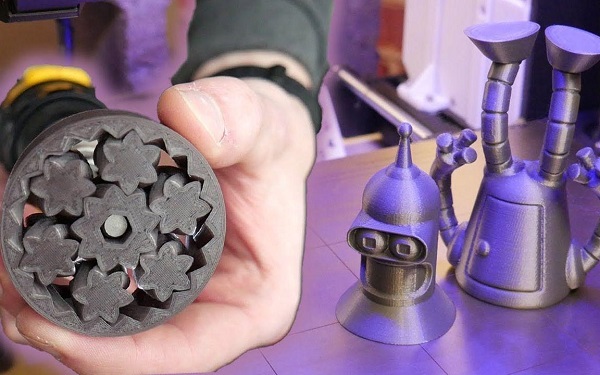
Fused Deposition Modeling (FDM) is what most people imagine for 3D printing. A nozzle heats plastic filament—like ABS or PLA—and deposits it layer by layer. Think of a hot glue gun controlled by a robot.
FDM shines for prototyping, education, and hobby projects. It's affordable and easy to use. A basic machine costs a few hundred dollars, and filament runs $20-50 per kilogram.
But there are trade-offs. Layer lines are visible, giving parts a slightly rough texture. For functional prototypes where appearance matters less than fit, that's fine. For display pieces, you might want something smoother.
Real-world example: A small product design firm I know uses FDM printers for initial concept models. They iterate through five designs in the time it used to take for one. When clients approve the shape and size, they move to higher-resolution methods for final presentation pieces.
SLA and DLP: When Detail Matters
Stereolithography (SLA) uses lasers to cure liquid resin into solid plastic. Digital Light Processing (DLP) does the same thing but projects entire layers at once, which can be faster.
These methods deliver stunning detail. Layer resolutions of 0.05 mm or less create smooth surfaces that look injection-molded. Jewelry designers use SLA to print master patterns for casting. Dental labs print surgical guides that fit patients perfectly.
The downsides? Resin costs more than filament—typically $50-150 per liter. Printed parts need washing in alcohol and post-curing under UV light. Support structures must be removed carefully. And uncured resin requires careful handling.
SLS: Strong Parts Without Supports
Selective Laser Sintering (SLS) fuses powder particles—nylon, metal, or ceramic—with a laser. The unsintered powder acts as natural support, so complex geometries print without extra structures.
Parts come out strong and functional. Aerospace and automotive industries use SLS for end-use components. A drone manufacturer might print lightweight brackets that hold cameras during flight.
Equipment is expensive—industrial machines run $100,000 and up. But service bureaus let you access the technology project-by-project without the capital investment.
Quick Comparison: Which Method Fits?
| Method | Best For | Resolution | Material Cost | Equipment Cost |
|---|---|---|---|---|
| FDM | Prototypes, large parts | 0.1-0.3 mm | Low | Low |
| SLA/DLP | Detailed models, jewelry | 0.025-0.1 mm | Medium | Medium |
| SLS | Functional parts, complex shapes | 0.1-0.15 mm | Medium-high | High |
| Metal printing | Aerospace, medical implants | 0.02-0.1 mm | High | Very high |
What Materials Can You Print With?
Plastics: The Everyday Workhorses
PLA (polylactic acid) is the beginner's friend. It prints easily, smells sweet rather than harsh, and comes from renewable sources like corn. But it gets soft in hot cars and degrades in sunlight over time. Great for prototypes, art pieces, and indoor use.
ABS (acrylonitrile butadiene styrene) is tougher and heat-resistant. Lego bricks are made from it. Automotive companies use it for interior parts. But it requires a heated bed to prevent warping and emits fumes during printing—good ventilation is essential.
PETG sits between them. It's stronger than PLA, easier than ABS, and resists moisture and chemicals. Many food containers are made from it. For functional parts that might get handled, PETG is a solid choice.
Metals: When Strength Is Non-Negotiable
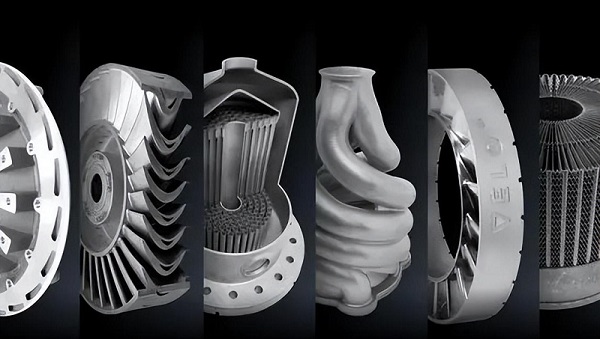
Titanium alloys offer incredible strength-to-weight ratios plus corrosion resistance. Medical implant companies print custom hip replacements that match patients' anatomy perfectly. Aerospace firms make brackets that save grams—and grams save fuel.
Aluminum powders print lightweight parts with good thermal conductivity. Heat sinks for electronics, custom engine components, and lightweight drone frames are common applications.
The catch? Metal 3D printing requires specialized equipment and strict process control. A single print run can cost thousands. But for the right application—like a custom surgical tool—the value justifies the expense.
Special Materials for Special Needs
Ceramics handle extreme heat and resist chemicals. Research labs print ceramic cores for investment casting. Dental labs create zirconia crowns that look natural and last decades.
Composites mix materials for enhanced properties. Carbon-fiber-filled nylon prints parts nearly as stiff as aluminum at a fraction of the weight. Industrial robot arms use these for lightweight end effectors.
Bio-materials are the frontier. Researchers print scaffolds that guide cell growth for tissue engineering. While mostly experimental today, this field points toward printing living tissues tomorrow.
How Do Industries Use These Technologies?
Aerospace: Lighter Parts, Fuel Savings
GE Aviation prints fuel nozzles for their LEAP engines. Traditional manufacturing required 20 parts welded together. 3D printing makes them as one piece. The result? 25% weight reduction and five times longer durability. Every kilogram saved on an aircraft saves thousands in fuel over its lifetime.
Airbus uses 3D scanning to validate prototypes. Engineers scan new designs, compare them to digital models, and refine quickly. What once took weeks now happens in days.
Automotive: From Restoration to Production
Volkswagen's classic car division faces a challenge: parts for 50-year-old vehicles aren't available anymore. They 3D scan existing parts, reverse-engineer them, and print replacements. A rare shift knob that would cost thousands to tool traditionally prints overnight for dollars in material.
For quality control, manufacturers scan finished parts and compare them to specifications. Deviations show up immediately, catching problems before they reach customers.
Medical and Dental: Perfect Fit, Faster Healing
Craniofacial surgeons reconstruct faces after accidents or cancer removal. Every patient's anatomy is unique. Using CT scans, they print surgical guides that fit exactly. One study found 20% lower complication rates with 3D-printed custom implants compared to standard ones.
Dental practices have transformed. Traditional impressions meant goopy material in your mouth for minutes. Today, intraoral scanners create digital models in seconds. Labs print crowns, bridges, and aligners that fit precisely. Patients leave happier, and dentists work more efficiently.
Construction: Building in Days Instead of Months
A European housing project 3D-printed a small house in under a week. Traditional construction would have taken months. The printer laid down concrete layers following designs optimized by AI for structural efficiency and material savings.
While full-scale construction printing is still emerging, architectural models have been standard for years. Firms print building models for client presentations, showing every detail before ground breaks.
What Software and Data Skills Do You Need?
CAD Software: Where Designs Begin
Computer-Aided Design (CAD) software is where you create models for 3D printing. Programs like SolidWorks, Fusion 360, or Tinkercad range from professional-grade to beginner-friendly.
For mechanical parts, parametric modeling lets you set dimensions and relationships. Change one parameter—like hole diameter—and everything updates automatically. For organic shapes, sculpting tools work like digital clay.
If you're starting, free options like Tinkercad teach fundamentals. As projects grow complex, investing in training pays off. A week learning efficient modeling saves months of frustration.
From Scan to Print: Processing Point Clouds
Raw scan data needs work before printing. Point-cloud processing cleans up noise—those stray points from reflections or vibrations. Registration aligns multiple scans into one complete model. Mesh generation turns points into solid surfaces.
Software like MeshLab or Geomagic handles these tasks. Expect a learning curve. But once mastered, you can take a rusty gear from a 1950s machine and create a printable replacement.
Reverse Engineering: Copying and Improving
Sometimes you have a part but no drawings. Reverse engineering solves this. Scan the part, process the data, and create a CAD model. Then modify as needed—add strength where original failed, reduce weight where possible, update for modern materials.
A client once brought us a broken plastic bracket from manufacturing equipment. The original supplier went out of business. We scanned the pieces, reconstructed the design, and printed replacements in glass-filled nylon—stronger than the originals. The line ran again within days, not months.
What Equipment Should You Buy?
Choosing Your First 3D Printer
For beginners, an FDM printer from reputable brands like Ultimaker or Prusa offers reliability without breaking banks. Look for:
- Heated bed (essential for ABS, helpful for others)
- Auto-leveling (saves frustration)
- Enclosure (maintains temperature, reduces fumes)
- Community support (active users mean helpful forums)
Expect to spend $500-2,000 for a capable starter machine. Factor in filament, maintenance tools, and ventilation.
When to Consider Professional Services
Not everyone needs to own equipment. Service bureaus like Yigu technology offer access to industrial machines without capital investment. For one-off projects, complex materials, or high-volume runs, this often makes more sense.
We've helped clients:
- Prototype designs before committing to production tooling
- Print small batches of custom parts for limited-run products
- Access metal printing for aerospace components
- Scan and reverse-engineer legacy equipment
Maintenance Matters
3D printers need care. Keep nozzles clean, belts tensioned, and moving parts lubricated. Calibrate regularly—a quick test print catches drift before it ruins real jobs.
For scanners, keep optics clean. Dust on lenses creates noise in scans. Store in protective cases when not used.
What Happens After Printing?
Support Removal: Freeing Your Part
Most prints need supports for overhangs. Removing them is like unwrapping a gift—satisfying but requiring care.
For FDM, snap or cut supports away. For SLA, soak in alcohol to soften supports before trimming. Water-soluble supports dissolve completely, ideal for complex internal passages.
Surface Finishing: From Rough to Refined
Layer lines are normal. Sanding smooths them out—start coarse, work to fine grits. Vapor smoothing uses chemical vapors to melt surfaces slightly, creating glossy finishes. Painting covers imperfections and adds color.
For metal parts, machining adds precision features. Heat treatment relieves stresses and improves properties. A turbine blade might go from printer to oven to CNC machine before installation.
Quality Control: Ensuring It's Right
Visual inspection catches surface issues. Calipers verify critical dimensions. For critical parts, non-destructive testing like X-ray or ultrasound reveals internal voids.
In aerospace, every 3D-printed component gets scanned and compared to its digital twin. If it matches, it flies. If not, it's scrap. No exceptions.
What's Coming Next?
AI Integration
Artificial intelligence already helps optimize designs for strength and weight. Soon, printers will self-adjust during prints, learning from each job to improve the next. Defect rates will drop further. Complex geometries will become routine.
New Materials
Expect more materials designed specifically for 3D printing. Self-healing polymers, conductive filaments, and bio-compatible resins are just starting. Each expands what's possible.
Faster, Bigger, Cheaper
Print speeds continue increasing. Build volumes grow. Costs decline. The technology that cost millions a decade ago now sits on desktops. This trend continues, making 3D printing accessible to more businesses and individuals.
Conclusion
3D scanning and printing have moved from novelty to necessity in many industries. They shorten development cycles, enable customization, and create geometries impossible with traditional methods. Success comes from matching technology to application—the right scanner for your objects, the right printer for your parts, the right materials for your requirements.
Start with your problem, not the technology. What are you trying to make or fix? Then work backward to the tools that solve it. And remember—you don't need to master everything alone. Services like Yigu technology exist to fill gaps, handle complex jobs, and guide your journey.
The future of making things is here. It's digital, it's customizable, and it's more accessible than ever.
FAQ
How much does a good 3D scanner cost for small business use?
Entry-level desktop scanners run $1,000-5,000 and work well for product design and quality control. Professional hand-held scanners range $10,000-25,000 with better accuracy and features. For occasional use, consider renting or using a service bureau instead of buying.
What's the easiest 3D printing material for beginners?
PLA is hands-down the easiest. It prints at lower temperatures, doesn't require a heated bed (though it helps), and sticks well to common surfaces. It's forgiving of mistakes and produces decent results even with basic settings.
Can I scan and print metal parts at home?
Scanning metal parts works fine at home. Printing them doesn't—metal 3D printing requires high-power lasers or electron beams, inert atmospheres, and often post-processing furnaces. It's strictly industrial today. But you can design metal parts, send files to services, and receive printed parts by mail.
How accurate are 3D-printed dental appliances?
Modern dental 3D printing achieves 25-50 micron accuracy—more than enough for crowns, bridges, and surgical guides. Many dentists now prefer printed models to traditional impressions because they're more comfortable for patients and equally accurate.
What's the typical failure rate for 3D prints?
With well-tuned machines and good designs, failure rates under 5% are reasonable. Complex geometries or new materials push this higher. AI monitoring can cut failures by half by catching issues early. Most failures happen in first few layers—watch those carefully.
Contact Yigu Technology for Custom Manufacturing
At Yigu technology, we bridge the gap between ideas and finished parts. Whether you need 3D scanning of existing components, design help for new products, or 3D printing in plastics or metals, we deliver quality results.
Our team brings years of hands-on experience across industries—aerospace, automotive, medical, and more. We've helped startups launch products, manufacturers solve production problems, and designers realize visions.
Contact us to discuss your project. Tell us what you're trying to make. We'll recommend the best approach, provide a quote, and handle the technical details. From one prototype to production runs, we're ready to help.